 RoomDisk
Turn any device into a spare disk
Make room on your phone. Move photos, videos and files straight to a device you own, like an old phone, a tablet or a laptop. No cloud, no account, nothing to install. Every file is checked when it lands, so you know what’s safe to delete.
Free to start. RoomDisk Pro $19 $14.99, paid once.
How it works
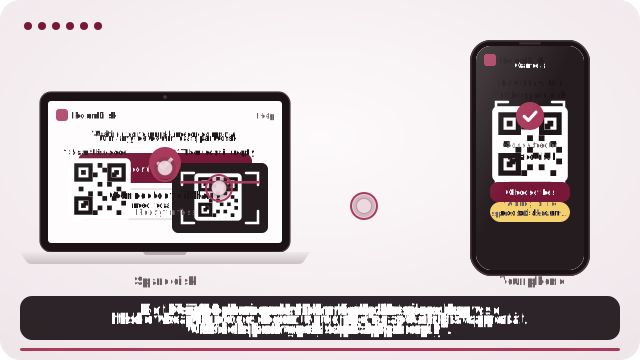
- Open RoomDisk on the device that will keep your files. It shows a code.
- Scan it with your phone’s camera. Your phone shows its own code; the spare disk scans that back.
- They connect by themselves. Send photos and videos, browse the disk, get files back.
Why RoomDisk
- Your files stay yours. They go straight from one of your devices to another; nothing is uploaded.
- Proven copies. Every file is checked with SHA-256 on both devices, so you know what’s safe to delete.
- Any device. iPhone, Android, Mac, Windows, Linux, on the same Wi-Fi or a phone hotspot.
- No subscription needed. Free to use; Pro is one payment.
Questions
Are my files uploaded anywhere?
No. Files go directly from one of your devices to the other over an encrypted WebRTC connection. RoomDisk has no server that receives or stores them.
Do I need to install an app?
No. RoomDisk runs in the browser on iPhone, iPad, Android, Mac, Windows and Linux. You can add a shortcut to your Home Screen or desktop so it opens like an app, offline too.
Do both devices need the same Wi-Fi?
Both devices need to reach each other: the same Wi-Fi, or one device’s hotspot (no data plan needed). To reach your disk from another network, there’s RoomDisk Anywhere.
What if I delete something by mistake?
Deleted files go to Recently deleted on the spare disk for 30 days. Open Files on the disk, tap Recently deleted, then Put back.
How do I know my spare disk is still healthy?
On the disk, open Settings and tap Check now. RoomDisk reads every file back and tells you if anything changed or is missing, so you can replace a failing drive while you still have the originals.
Does it work without internet?
Yes, after the first visit. Turn on one phone’s hotspot, join it with the other device, and pair as usual. Nothing goes over the internet.
Help guide · Guides · Pricing
Find that old phone. Put it to work.
Free to start. Nothing to install.